
Apresentando fluxos de trabalho baseados em geocercas: as regras certas para o lugar certo
.webp)
Uma diretora de logística de uma empresa de entregas de médio porte relatou um problema recorrente à sua equipe de operações: os motoristas estavam sendo filmados enquanto passavam por bairros residenciais em suas rotas. Os moradores ocasionalmente notavam as câmeras e reclamavam. Os motoristas sentiam que o monitoramento era desproporcional ao risco. O fornecedor de telemática de vídeo deles não tinha solução para isso, pois o sistema não tinha noção de localização. As câmeras não conseguiam se comportar de maneira diferente dependendo de onde o veículo estava.
Esse é um problema de conformidade e confiança que nenhum processo manual consegue resolver de forma confiável. Ele precisa ser automatizado. E precisa estar vinculado à localização.
Geofencing é a capacidade de desenhar um limite virtual ao redor de um local real e acionar automaticamente ações específicas quando um veículo o atravessa: sem intervenção do motorista, sem configuração manual, sem exceções.
A localização sempre foi importante. Sua telemática de vídeo não sabia disso. Até agora.
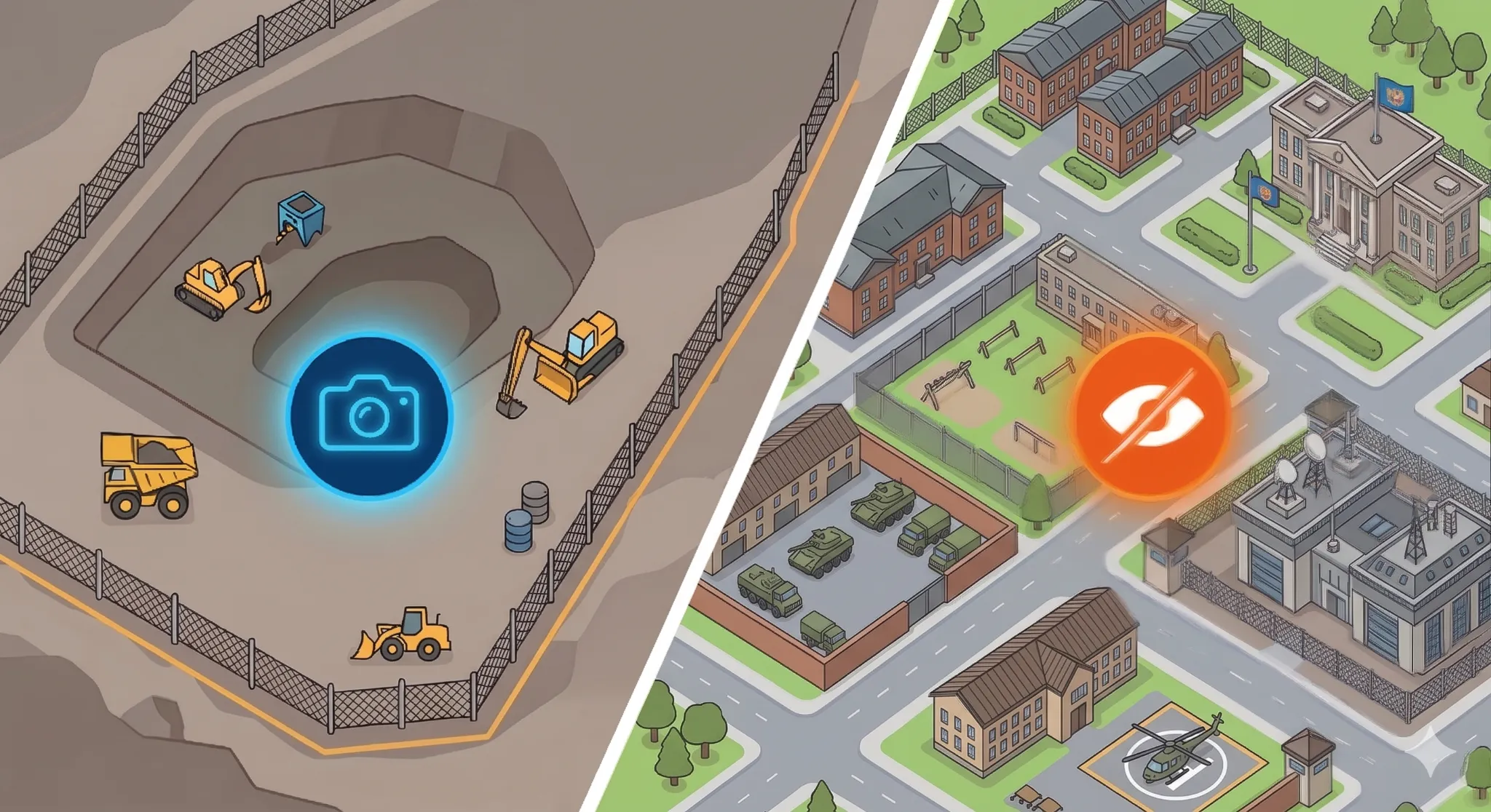
Toda frota opera em uma variedade de contextos. Um centro de distribuição tem requisitos diferentes de uma rua residencial de entrega. Um perímetro de mineração exige visibilidade total. Uma área de descanso do motorista exige privacidade. Uma zona escolar justifica um monitoramento intensificado. Um trecho de rodovia, não.
No entanto, a maioria dos sistemas de telemática de vídeo aplica as mesmas regras em todos os lugares. As mesmas câmeras, o mesmo comportamento de gravação, o mesmo consumo de dados, independentemente de o veículo estar dentro de uma instalação segura ou passando em frente à casa de alguém.
Os fluxos de trabalho baseados em geofence, agora disponíveis na plataforma RideView, mudam isso. Operadores de frota e provedores de serviços de telemática agora podem definir limites geográficos e configurar exatamente o que acontece quando os veículos os atravessam. De forma automática, confiável e sem que nenhuma ação seja necessária por parte do motorista.
O que isso significa na prática
A melhor maneira de entender os fluxos de trabalho de geofence é ver o que eles tornam possível.
Uma frota de mineração operando em terreno remoto costumava manter as câmeras ligadas durante todo o ciclo de turno, incluindo o longo trajeto de volta para a cidade. Isso significava consumo desnecessário de largura de banda em redes celulares caras. Os motoristas se sentiam vigiados muito tempo depois de terem deixado o local. Com os fluxos de trabalho de geofence, as câmeras e a detecção por IA são ativadas automaticamente quando os veículos entram no perímetro da mina e entram no modo de privacidade no momento em que saem. Os custos de largura de banda caíram. A confiança do motorista melhorou. Nenhuma alteração de configuração é necessária no próprio veículo.
Esses não são casos isolados. Eles são a realidade cotidiana da operação de uma frota moderna. Os fluxos de trabalho de geofence oferecem aos gerentes de frota a infraestrutura para adaptar seu comportamento de telemática a essa realidade.
O que você pode configurar hoje
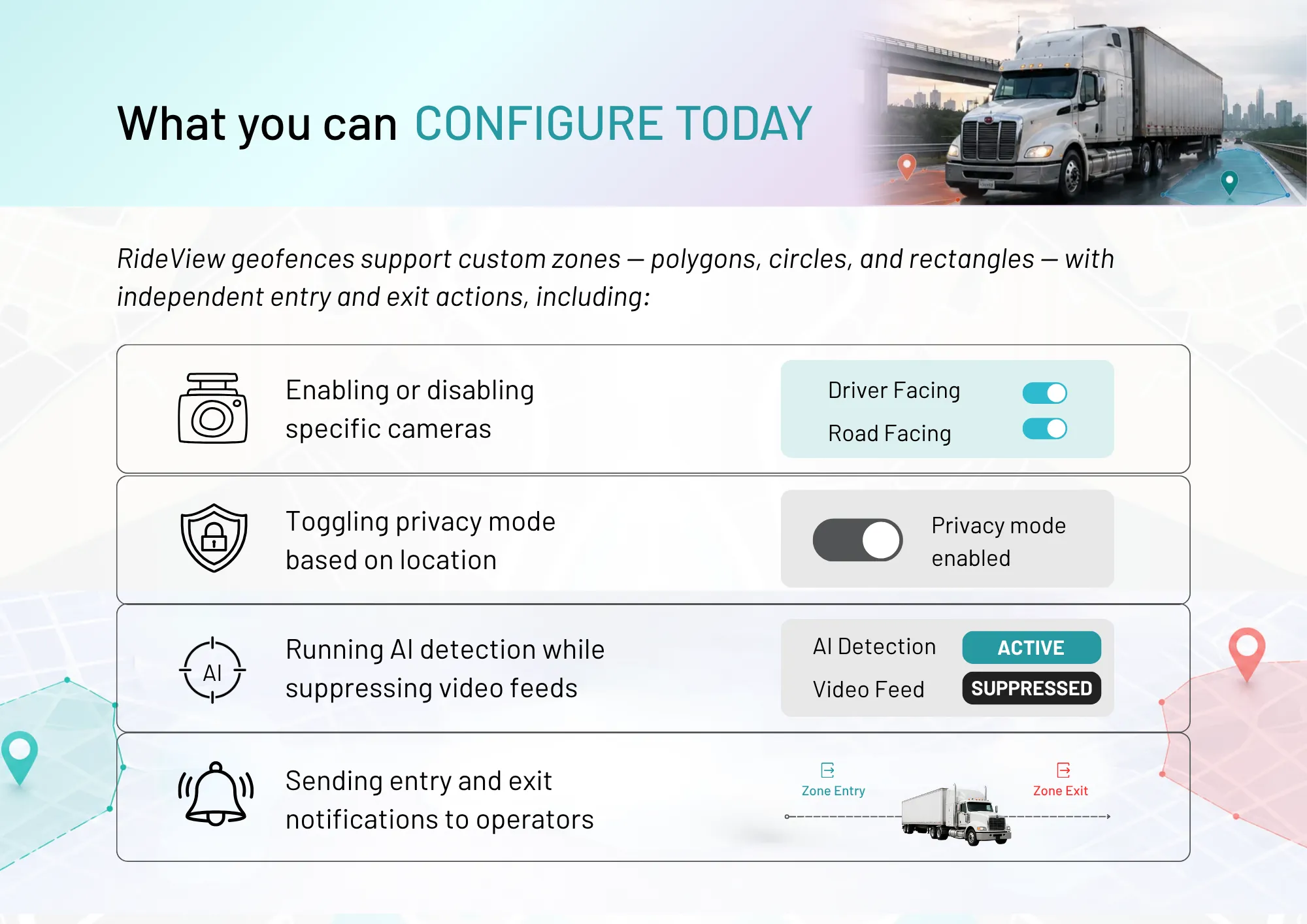
Um buffer integrado de 30 segundos evita disparos falsos quando os veículos ficam próximos aos limites ou quando as leituras de GPS oscilam. É um detalhe pequeno, mas é o que separa a automação confiável da automação imprecisa.
As regras de geofence são processadas no próprio dispositivo. Isso significa que as ações são acionadas mesmo quando a conectividade está ausente ou intermitente, o que é fundamental justamente para os tipos de operações remotas para as quais esse recurso foi criado.
Geocercas podem ser atribuídas a grupos de veículos por meio de etiquetas de ativos. Uma única configuração é aplicada automaticamente a todos os veículos relevantes. Adicionar novos veículos a uma etiqueta os insere no fluxo de trabalho instantaneamente. Importar zonas existentes de GeoJSON, KML ou CSV significa que você não precisa redesenhar limites que já definiu em outro lugar.
Cada viagem agora exibe a atividade da geocerca: quando um veículo entrou ou saiu de uma zona, quais ações foram acionadas e quanto tempo ele passou lá dentro. Para operadores que precisam verificar a conformidade ou investigar incidentes, essa visibilidade já vem integrada.
O futuro desta funcionalidade
A Fase 1 foca na automação do comportamento principal da telemática de vídeo com base na localização. A próxima fase irá além. Captura automática de vídeo na entrada e saída de zonas, geração seletiva de eventos, desfoque de vídeo dentro de áreas definidas e suporte para geocercas sobrepostas com resolução baseada em prioridade. Mais adiante, regras baseadas em tempo, monitoramento de adesão a rotas e gerenciamento de zonas de acidentes estão no roteiro.
Estamos construindo isso em estreita colaboração com parceiros TSP e operadores de frota. A direção é moldada pelos problemas que vocês realmente resolvem.
Como começar
Os fluxos de trabalho baseados em geocercas já estão ativos na plataforma RideView. Se você já é cliente, o recurso está disponível em seu portal agora. Nenhuma configuração adicional é necessária para começar.
Se você é um provedor de serviços de telemática ou operador de frota avaliando o RideView, entre em contato pelo e-mail contact@lightmetrics.co. Mostraremos como os fluxos de trabalho de geocerca podem ser configurados para suas operações específicas.
A localização sempre foi a variável que faltava na inteligência de frotas. Agora, não é mais.
