
What Is the Best Multi-Camera Dashcam System? A Buyer's Guide for Fleets
Learn how to choose the best multi-camera dashcam system for your fleet, from camera angles and AI capabilities to driver coaching, video access, reliability, and integration.
Running a commercial fleet means living with risk on every trip. A driver can do everything right and still get blamed for a crash they did not cause. When that happens, the video you have decides who pays.
That is why so many fleet managers start asking about multi-camera dashcam systems. One camera pointed at the road ahead misses a lot. It cannot show what happened beside the truck or what the driver was doing at the wheel.
The problem is that most buying guides are written for a personal car, not a business. They talk about picture quality and parking clips. They rarely explain what extra camera angles are worth when your goal is safer drivers, fewer claims, and a protected business.
This guide fixes that. It explains what a multi-camera dashcam system is, how the cameras are counted, and how to pick the right one for a fleet.
What Is a Multi-Camera Dashcam System?
A multi-camera dashcam system is a single system that uses two or more cameras to record different views around and inside a vehicle at the same time. One camera watches the road ahead. Others can watch behind the vehicle, to the sides, or the driver in the cab.
Compare that with a single-camera setup. A single camera only sees the road in front of the vehicle. It captures a crash straight ahead, yet it stays blind to everything else that matters.
"The best" system is not one fixed product. The right choice depends on how many angles you need and what you plan to do with the footage.
For a business, the goal reaches past capturing a crash. You want to protect your drivers and your company. That means seeing enough of each trip to prevent problems and to prove what really happened.
How Multi-Camera Systems Are Counted: Channels and Angles
People often describe these systems by counting cameras. The word you will see most is "channel." Once you know what a channel is, the labels on every product page start to make sense.
This section breaks down that word, the common camera angles, and how to think about the number of cameras a vehicle needs.
What "Channel" Means
A channel is one camera feed. Each channel is a single view the system records.
So a two-channel system has two cameras. A three-channel system has three cameras, and so on. When you read "dual dash cam" or "three-channel dash cam," the seller is simply telling you how many camera feeds come with the system.
The Common Camera Angles
Different channels point in different directions. Each angle does a specific job.
Here are the views you will run into most:
- Front (road-facing): This camera watches the road ahead. It captures the traffic, the lane, and what the driver sees coming.
- Rear: This camera watches behind the vehicle. It helps with backing up and shows anyone following too closely.
- In-cabin (driver-facing): This driver-facing camera watches the driver. It shows whether the driver was alert, looking at the road, or distracted.
- Side: These cameras watch the left and right of the vehicle. They cover blind spots along a truck or van where crashes and near-misses happen.
The table below maps common channel counts to the angles they usually cover.
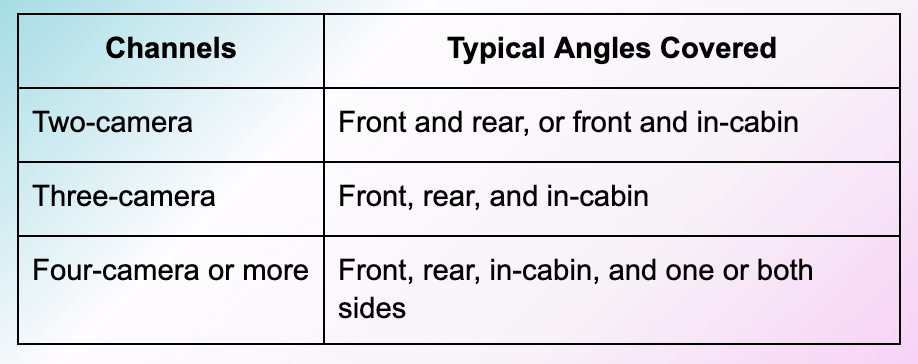
For a fleet, the pairing that matters most is road-facing and driver-facing together. Seeing the road tells you what the driver faced. Seeing the driver tells you how they responded. Put both views side by side and you can understand almost any event.
How Many Cameras Does a Vehicle Need?
There is no single answer that fits every fleet. The right count depends on the vehicle type and on what you need to prove or prevent.
A light van doing local deliveries has different risks than a long-haul truck. A truck has larger blind spots and spends more hours on the highway, so it often benefits from side coverage.
A good rule is to start with the road-facing and driver-facing pair. Add rear and side cameras when your vehicles are large, when you handle a lot of backing and maneuvering, or when past claims have exposed a blind spot you could not see before.
What Separates a Basic Recorder From an AI Fleet System
Not every multi-camera system does the same job. Two systems can have the same number of cameras and still work in very different ways.
The real split is between a system that only records and a system that also understands what it sees. That difference changes what more camera angles are worth.
Recording vs. Understanding the Footage
A basic system stores video for you to review after something happens. The cameras roll, the files save, and you go looking for the clip once a problem is reported.
An AI system reads the video as it happens and flags risky behavior on its own. AI here means software that recognizes patterns, so it can tell the difference between an ordinary trip and a dangerous moment. Much of this runs on edge AI, which means the software processes the video right inside the camera on the vehicle instead of waiting to send everything to the cloud.
This is where more camera angles pay off. Because the software can watch both the road and the driver at once, it catches things a single view would miss, like a driver looking down in distraction while traffic slows ahead.
In-Cab Coaching and Driver Protection
An AI fleet system does more than sort footage. It steps in during the trip and stands behind the driver afterward.
Here is what that looks like in daily use:
- In-cab alerts: The system warns the driver in the moment, such as a spoken alert when it sees distraction or drowsiness. That gentle nudge helps the driver correct before anything goes wrong.
- Driver coaching: Safety managers review flagged moments and work with drivers on specific habits, rather than watching hours of raw video.
- Driver exoneration: When a crash happens and someone files a false or exaggerated claim, the paired road and driver footage shows what really occurred and clears an innocent driver.
- Risk trends over time: The system tracks flagged events across drivers so safety managers can spot which habits keep showing up and coach the whole team on them.
LightMetrics built its RideView platform around this idea. RideView coaches drivers before bad outcomes happen, and it protects them with on-demand video when incidents do occur.
What to Look for When Choosing a Multi-Camera System
Once you know how these systems work, the buying choice gets clearer. A few practical points separate a system that helps your fleet from one that just adds cameras.
Use the points below as a checklist while you compare options.
Coverage and Video Quality
Start by matching camera angles to your real risk. If most of your trouble comes from following distance and driver attention, road-facing and driver-facing coverage should come first.
Video quality matters too, in plain terms. The footage needs to be clear enough to read a license plate, see a traffic light, and show the driver's eyes and hands. Blurry or dark video helps no one.
More cameras only help if each feed is usable. Extra angles add little when the picture is too poor to trust in a dispute.
Everyday Reliability: Parking, Storage, and Connectivity
Fleet cameras have to work every day without babysitting. A few basics keep them dependable.
- Parking protection: The system keeps watching while the vehicle is parked, so you catch hit-and-runs and damage that happen off the clock.
- Storage: Video saves reliably on the device and does not overwrite the clips you need before you can pull them.
- Cloud access: You can reach video from wherever you manage the fleet, without visiting the vehicle to grab a memory card.
- Camera health checks: The system flags a camera that goes offline or drifts out of alignment, so you do not lose coverage without knowing it.
Remote video access carries real weight when you run many vehicles. Sending someone to each truck for footage does not scale, so pulling the clip you need from your desk saves hours.
Fit With Your Existing Systems
A fleet camera does not work alone. For fleets and providers, the system should fit with the telematics and camera hardware you already run. Telematics means the software that tracks your vehicles and their data, such as location and trips.
This is where a hardware-agnostic platform helps. Hardware-agnostic means the software works across many camera brands instead of locking you into one. You keep your options open on hardware while your team learns a single system.
RideView follows this "any camera, one backend" approach. Providers can offer video telematics on a choice of cameras through one backend and one experience, with dashboards they can put their own brand on.
Consumer vs. Fleet Multi-Camera Systems
Consumer and fleet systems can look alike on a shelf, yet they solve different problems. A consumer camera mostly gathers personal evidence for one driver after a crash.
A fleet system adds AI, driver coaching, and central management across many vehicles at once. It is built for a business that has to prevent incidents, protect drivers, and manage a whole fleet from one place.
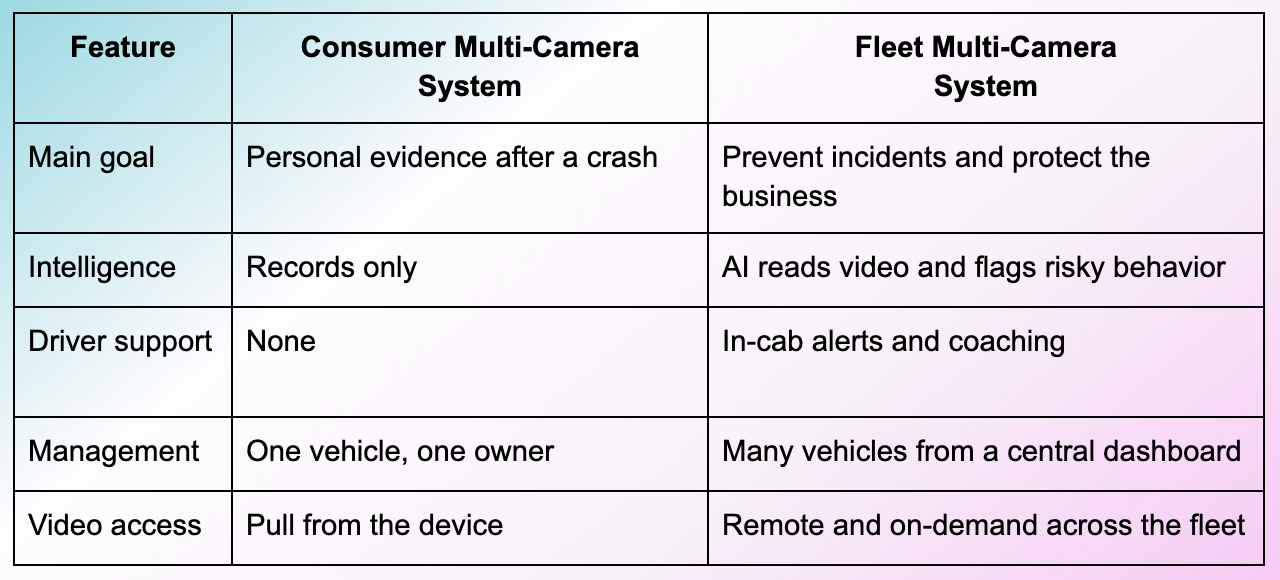
For a business audience, the fleet-grade system is the right lens. It treats cameras as part of a safety program, not as a gadget in the cab.
The best multi-camera dashcam system is the one whose angles and intelligence match your goals. For a personal car, that might mean front and rear coverage for evidence. For a fleet, it means AI paired with road-facing and driver-facing views.
That pairing lets the system watch both the road and the driver, coach in the moment, and clear drivers when a false claim lands. More cameras give you more to see, and AI turns what those cameras see into safer trips and a protected business.
As fleets keep raising the bar on safety, the winners will be the ones who treat cameras as part of a coaching and protection program. The angle you choose today shapes how well you can defend your drivers tomorrow.
RideView by LightMetrics brings edge AI, road-facing and driver-facing coverage, in-cab coaching, and on-demand video into one platform that works with your choice of cameras. See how it can help your fleet prevent incidents, protect drivers, and lower the cost of operations.
Frequently Asked Questions
What Is a Multi-Camera Dashcam System?
A multi-camera dashcam system is one system that uses two or more cameras to record different views around and inside a vehicle at the same time. It gives you a fuller picture of each trip than a single road-facing camera can.
What Is a Three-Channel Dash Cam?
A three-channel dash cam is a system with three camera feeds, usually front, rear, and in-cabin. It records the road ahead, the view behind, and the driver in the cab together.
How Many Cameras Does My Vehicle Need?
There is no single right number, because it depends on your vehicle type and what you need to prove or prevent. A good starting point is road-facing and driver-facing coverage, with rear and side cameras added for larger vehicles or bigger blind spots.
Do Multi-Camera Dash Cams Record While Parked?
Many multi-camera systems offer a parking mode that keeps watching while the vehicle sits still. This helps you catch damage and hit-and-runs that happen when no one is driving.
Are Dash Cams With Driver-Facing Cameras Legal?
Driver-facing cameras are widely used in commercial fleets, and rules on recording and audio consent vary by state. Fleets should check local requirements and choose a system with privacy controls that keep them compliant.
What Is the Difference Between a Consumer and a Fleet Multi-Camera System?
A consumer system mainly records personal evidence for one driver, while a fleet system adds AI, in-cab coaching, and central management across many vehicles. The fleet version is built to prevent incidents and protect a business, not just capture a crash.
What Is an AI Dash Cam?
An AI dash cam is a camera system with software that reads the video as it happens and flags risky behavior, rather than only storing footage for later. It can warn a driver in the moment and help safety managers coach specific habits.
