
Commercial Dash Cam Software: How to Choose the Best Platform for Your Fleet
Learn how to choose commercial dash cam software with AI detection, driver coaching, cloud video, telematics integration, diagnostics, and privacy controls.
What Is Commercial Dash Cam Software?
Commercial dash cam software is the platform that turns raw camera footage into safety insight and usable evidence for your fleet. It watches what happens on the road and in the cab, then flags the risky moments so managers can act on them without watching hours of video.
A consumer dash cam mostly saves clips to a memory card that someone has to pull and review by hand. Commercial dash cam software does the reviewing for you, sorting the moments that matter from the ones that do not.
The camera is the hardware that captures video. The software is where the value lives, because it decides what your team actually sees and does with that footage.
Think of a fleet dash cam as two parts working together. The camera collects the video, and the software behind it makes that video worth having.
Why the Software Matters More Than the Camera
Most cameras built for commercial vehicles record similar video quality. Because the hardware has become a commodity, the platform behind the camera is what decides the real value your fleet gets.
Weak software costs you time and money in quiet ways. Managers burn hours scrubbing through footage to find one event, and incidents get resolved slowly because the right clip is hard to reach.
Strong video telematics software flips that. It surfaces the important events first, pairs each one with location and speed data, and lets a manager respond in minutes rather than hours.
There is also the question of flexibility. Some platforms lock you into one camera model, so if you want the software, you have to accept whatever hardware comes with it.
A better model is hardware-agnostic. This means one software experience runs across different cameras at different price points, so your fleet picks the camera that fits your budget and still gets the platform it needs. RideView is built this way, with any camera, one backend, and one user experience, so the software you rely on does not change when the hardware does.
Core Features of the Best Commercial Dash Cam Software
The features below are what separate a real platform from a plain recorder. A recorder stores video, while a platform reads it and then helps your team act on what it finds.
As you read, notice how each capability builds on the last. Detection finds risk, coaching corrects it, and video and data give you proof and context when you need them.
AI Event Detection and Edge AI
AI event detection means the software recognizes specific risky moments on its own, instead of leaving a person to spot them later. Edge AI means that recognition happens on the camera device itself, not only after video is sent to the cloud.
The best AI dash cam for fleets can catch a range of behaviors. These include distracted driving, drowsiness, tailgating, and speeding.
Running the analysis on the device brings two clear benefits. Alerts happen faster because the camera does not wait to upload video first, and driver footage can stay more private because less of it has to leave the vehicle.
RideView runs its edge AI on competitively priced cameras and detects a wide set of risky behaviors and road events, so driver behavior monitoring does not depend on expensive hardware.
Real-Time In-Cab Coaching
In-cab coaching is a voice or audio alert that speaks to the driver in the moment. If the driver drifts from the lane or follows too closely, the camera prompts them to self-correct right away.
This matters because the alert comes before an incident, not after one. Instead of a manager reviewing a crash days later, the driver fixes the behavior while it is happening.
Coaching drivers in the cabin before bad outcomes happen sits at the center of what RideView does. The goal is to prevent the event while there is still time to change it.
Cloud Video and On-Demand Retrieval
Cloud video means footage uploads to a secure online location that managers can reach from anywhere. On-demand retrieval lets a manager pull a specific clip, or watch live video, without driving out to the vehicle.
This changes how fast a fleet can respond. When a driver is blamed for a crash they did not cause, the manager can retrieve the video and use it to exonerate the driver against false or exaggerated claims.
A dash cam with GPS makes that footage even more useful, because each clip carries the location and time it happened. RideView provides on-demand video that protects fleets and clears drivers when the story does not match the footage.
Driver Coaching Workflows and Scorecards
A coaching workflow is a structured way to turn an event into an action. The software lets a manager assign an event, review it with the driver, then track whether the coaching happened and whether the behavior improved.
Driver scorecards roll those events into a simple picture of how each driver is doing over time. Managers can see who needs help and who is improving, so they coach people instead of watching footage all day.
RideView supports these workflows with user roles and driver groups, plus tagging that keeps coaching organized as a fleet grows.
Telematics and GPS Integration
Video telematics is video paired with vehicle data such as GPS location and speed. Adding that data gives full context to each event, so a hard-braking clip also shows where it happened and how fast the vehicle was going.
Integration matters just as much. Your dash cam software should connect to the fleet systems you already use, so video lives alongside your other operational data rather than in a separate silo.
RideView offers deep telematics integration and rich APIs, and its dashboards can be rebranded and placed inside a partner's own portal through single sign-on or an embedded frame.
Device Diagnostics and Managing Cameras at Scale
Diagnostics is the quiet work of keeping cameras healthy and online across your whole fleet. A camera that is offline or out of alignment captures nothing, so this operational layer decides whether the rest of the software can even do its job.
Good platforms handle this with over-the-air updates and camera health monitoring, so problems get caught and fixed remotely. Self-installation with automatic calibration also helps, because a driver can mount the camera and have it align itself without a technician visit.
Most competitors say little about this. RideView treats diagnostics and device management as a core strength, built to keep thousands of field cameras working across a large fleet.
Driver Privacy Controls
Privacy controls define when recording is active and give drivers a reasonable degree of control over the driver-facing view. A dual facing dash cam watches both the road and the cab, so how you handle the in-cab side shapes how drivers feel about it.
When drivers trust that the camera respects their privacy, they accept it more readily, and adoption across the fleet goes smoother. Privacy is central to how RideView is designed, which also helps fleets comply with the rules that apply where they operate.
AI Dash Cam Software vs Basic Recording
A basic recorder and AI dash cam software can use the same dual facing dash cam, yet they do very different jobs. One stores video and waits for a person, while the other reads the video and acts on it.
The table below shows how the two compare on the things a fleet cares about most.
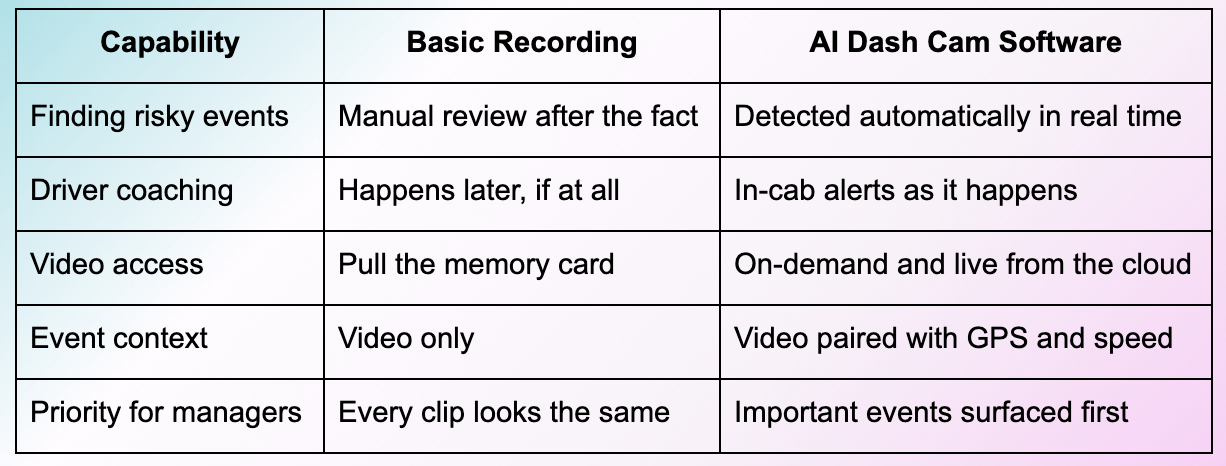
RideView sits firmly on the AI and real-time side of this comparison. It does not wait for someone to find the problem, because the software finds it and coaches the driver first.
How to Evaluate Commercial Dash Cam Software
When you compare platforms, look past the camera spec sheet and judge what the software can do. The checklist below covers the questions that separate the best commercial dash cam software from a basic option.
Read total cost of ownership as the full picture rather than the sticker price. A cheap camera can cost more over time if the software is weak, the install needs a technician, or support is thin.
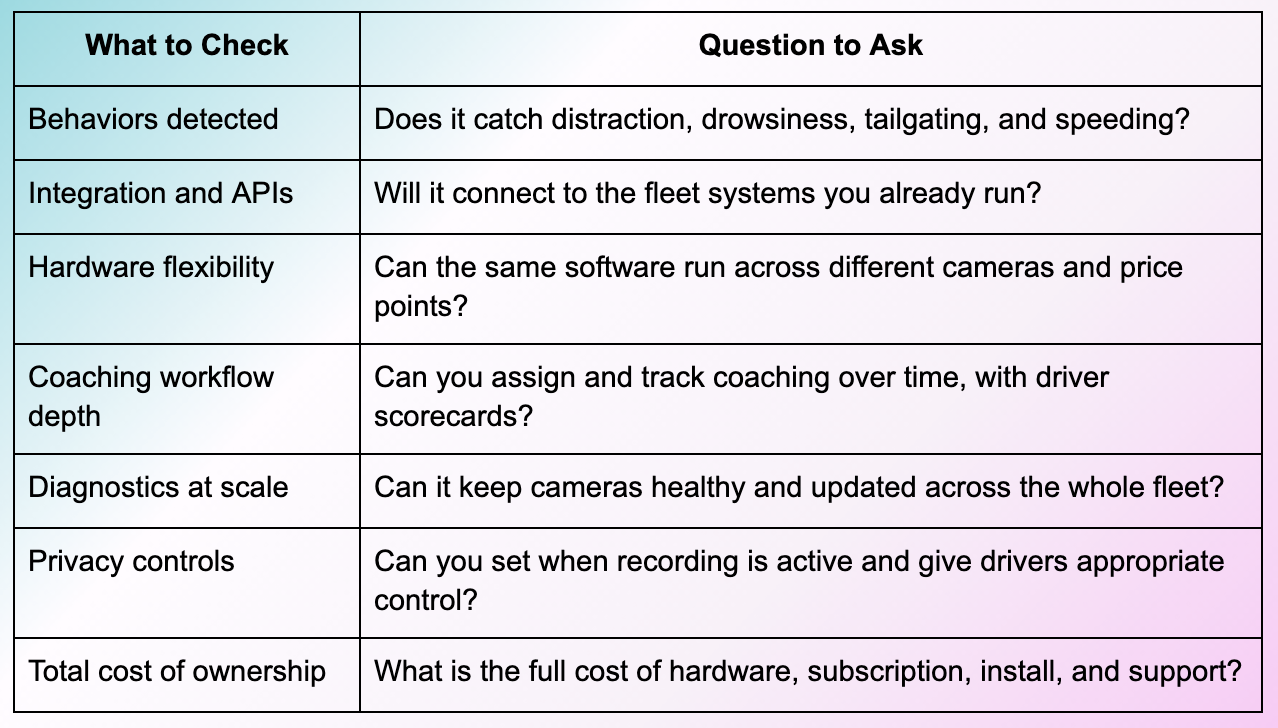
Two criteria deserve extra weight. A hardware-agnostic model keeps you from being locked to one camera, and software built in-house tends to get new features and AI improvements faster. RideView was built on both, which is why it works well as a benchmark for what strong truck dash cam software should offer.
Compliance and Privacy Considerations
Where you mount a dash cam matters for commercial vehicles. A windshield-mounted device must not block the driver's view of the road, so placement follows both federal guidance and common sense.
Audio recording carries its own rules. Some states require driver consent before you record audio inside the cab, so a driver-facing camera needs a clear policy behind it.
The safe approach is to check federal and state rules before you roll cameras out, and to tell drivers plainly what the system records. Fleet safety software designed with privacy in mind makes this easier, because the settings you need to stay compliant are built into the platform.
In conslusion, the camera your fleet chooses matters less than the platform behind it. Once you accept that the software decides day-to-day value, the choice becomes clearer.
Look for real-time AI detection, in-cab coaching, on-demand video, deep telematics integration, diagnostics at scale, and privacy controls you can trust. Weigh the full cost of ownership rather than the price on the box, and favor software that is flexible across cameras and quick to improve.
Fleet video is moving toward software-defined, hardware-agnostic platforms, where the value follows the software rather than the camera. Fleets that evaluate on that basis today will be ready for where the industry is heading.
Ready to See What Great Fleet Dash Cam Software Looks Like?
RideView is the edge AI video telematics platform that powers many of the branded safety solutions fleets already trust, with real-time coaching, on-demand video, and diagnostics built to run across any camera. If you want to see what the software behind a leading fleet dash cam can do, Request a demo.
Frequently Asked Questions
What is commercial dash cam software?
It is the platform that turns dash cam footage into safety insight and usable evidence, so a fleet can act on video instead of only storing it.
What makes the best dash cam software for a fleet?
The best platforms detect risky behavior in real time and coach drivers in the cab, then give managers fast access to relevant video paired with vehicle data.
What is the difference between AI dash cam software and basic recording?
Basic recording stores video for someone to review later, while AI software detects risk as it happens and coaches the driver before an incident.
Does commercial dash cam software integrate with fleet management or telematics systems?
Strong platforms integrate through APIs so video sits alongside your GPS, speed, and other fleet data rather than in a separate system.
Do I need driver consent to use a driver-facing camera?
In some states you do, especially for in-cab audio, so check your federal and state rules and set a clear consent policy before rollout.
Does dash cam software keep working when the vehicle is off?
Many systems can capture events while parked, though the exact behavior depends on the platform and how the camera is configured.
